It's been asked long ago, but many things have changed/improved since then.
I'm getting ready to buy a 10" (Toshiba) NetBook this year. 2GB memory and a replacement SSD are planned. Besides using it to bluetooth link with my GS-911 plugged into 2 wheel Beemers, it'd be nice to have net access everywhere I go, without the humongous weight/bulk of my 17" HP LapTop. Unfortunately, all NetBooks come with "Windows 7 Starter" OS that has many Win7 Home Premium default features omitted to save HDD space, accommodate the default 1GB memory, 1024 x 600 native resolution screen and the low power 1.5 GHz Intel Atom processor. I only need an OS that can run FireFox, a simple photo editing program and ThunderBird portable E-Mail on a FlashDrive combined with the enviable throw-it-in-the-TailTrunk portability a NetBook provides. Do NOT want an iPad (too vulnerable and too $$$) or a bigger LapTop - - - I already have one with the P.O.S. Vista BloatWare on it.
That brings me to a popular, refined, more user friendly Linux distro like Kubuntu 10.10 that I have already downloaded. There are 2 different (free) 729MB .iso files, meant to be burned to CDR (or run from a FlashDrive). One .iso file for Desktops/Laptops and the second one tailored just for NetBooks. Have not tried one yet, but I also saved the recommended USB-creator program to boot/install/run either OS from a USB flashdrive. I believe Kubuntu allows configuring a dual boot OS choice upon installation. NetBooks do not have optical drives, but I have an external, slim, portable USB powered DVD/CDRW one waiting to be used. I also have Partition Commander V10 to custom slice-n-dice a HDD.
Type to me.
1--What can I expect transitioning from WinXP Home?
2--What's your opinion of the hundreds of free Linux program downloads available to do just about anything?
3--What are the must have add-on Linux programs?
4--What about viruses?
5--What distros have you tried and how often do you switch?
6--How many HDD partitions and what sizes?
.
What about Linux?
Moderator: Moderators
-
CycleRob

- Honorary Lifer
- Posts: 2857
- Joined: Mon Mar 21, 2005 12:29 am
- Location: Enjoying retirement in Gainesville GA. USA
- Contact:
What about Linux?
`09 F800ST
Member since Sept 10, 2001
"Talent, On Loan, From God" --Rush Limbaugh--
Member since Sept 10, 2001
"Talent, On Loan, From God" --Rush Limbaugh--

Re: What about Linux?
Rob, I teach Linux Desktops at the Community College and have used EVERYTHING. I will PM you my number. I am happy to help you in any way possible.CycleRob wrote:It's been asked long ago, but many things have changed/improved since then.
I'm getting ready to buy a 10" (Toshiba) NetBook this year. 2GB memory and a replacement SSD are planned. Besides using it to bluetooth link with my GS-911 plugged into 2 wheel Beemers, it'd be nice to have net access everywhere I go, without the humongous weight/bulk of my 17" HP LapTop. Unfortunately, all NetBooks come with "Windows 7 Starter" OS that has many Win7 Home Premium default features omitted to save HDD space, accommodate the default 1GB memory, 1024 x 600 native resolution screen and the low power 1.5 GHz Intel Atom processor. I only need an OS that can run FireFox, a simple photo editing program and ThunderBird portable E-Mail on a FlashDrive combined with the enviable throw-it-in-the-TailTrunk portability a NetBook provides. Do NOT want an iPad (too vulnerable and too $$$) or a bigger LapTop - - - I already have one with the P.O.S. Vista BloatWare on it.
That brings me to a popular, refined, more user friendly Linux distro like Kubuntu 10.10 that I have already downloaded. There are 2 different (free) 729MB .iso files, meant to be burned to CDR (or run from a FlashDrive). One .iso file for Desktops/Laptops and the second one tailored just for NetBooks. Have not tried one yet, but I also saved the recommended USB-creator program to boot/install/run either OS from a USB flashdrive. I believe Kubuntu allows configuring a dual boot OS choice upon installation. NetBooks do not have optical drives, but I have an external, slim, portable USB powered DVD/CDRW one waiting to be used. I also have Partition Commander V10 to custom slice-n-dice a HDD.
Type to me.
1--What can I expect transitioning from WinXP Home?
2--What's your opinion of the hundreds of free Linux program downloads available to do just about anything?
3--What are the must have add-on Linux programs?
4--What about viruses?
5--What distros have you tried and how often do you switch?
6--How many HDD partitions and what sizes?
.
-Bob-
2014 R1200R - Dark White
2007 R1200R - SOLD
2014 R1200R - Dark White
2007 R1200R - SOLD
-
iowabeakster

- Quadruple Lifer
- Posts: 1962
- Joined: Mon Mar 21, 2005 5:43 am
- Location: iowa city, ia
Re: What about Linux?
I am sure that angellr will be able to help you more than I can. But, I do now consider myself a full-time Linux user (by default so is my wife)... so it can be done by non-computer experts.
My answers...
1--What can I expect transitioning from WinXP Home?
The very basics are pretty straightforward and the pretty much same as using Windows. Things like basic desktop operation (graphical user interfaces=GUI's) are basically the same. Point the mouse at an icon... click. Things have come a long way for linux and it's getting easier all the time. When you've loaded a linux OS, it'll look pretty familiar compared to windows.
Where things get different is when making changes to the system (say.... installing programs and uninstalling programs). This has also become much easier with things like "Synaptic Package Manager" in Ubuntu. Linux is very protected... making changes requires the user to understand permissions. Then, making changes often requires a person to create "command lines" (cryptic words and symbols) in a "terminal". A fairly enteraining read I would recommend is, "In The Beginning Was the Command Line" (link below... need to download zip-file). This "command line in a terminal" is what scares away most people. There will be some learning needed! Make no mistake about it. This is where Angellr should be able to help, as needed. There is also a good Ubuntu discussion board (2nd link below) for help with issues.
http://www.cryptonomicon.com/beginning.html
http://ubuntuforums.org/
I am no expert! Although, I have used some various linux distributions for over a decade. I've used the above discussion board (search functions) to find answers to every issue I've had. Patience and tolerance for frustration will be an asset.
Linux is a fringe element. Hardware manufacturers (say Hewlett Packard) make drivers for their hardware to work with an operating system (say for windows or apple). They don't usually make one for Linux. There are geeks out there making drivers, however. They may not be perfect, and you may need to hunt around to find your best option (trial and error).
Most commercial software makers also make their programs to work on a particular OS (and mostly, not available for Linux). Some Windows programs can be run by WINE (a windows emulator program). Some Windows programs won't work with WINE.
Garmin's Map Source is a good example. Programs like Map Source are why most people dual-boot. I have recently stopped dual-booting altogether, in favor of the Virtual Box program for the rare use of Windows. The Virtual Box program opens a window, and in this window I run a completely independent OS (I use Windows XP). Your system must have the memory, CPU power, etc., to do this well. I think I only have 3 programs that I use the virtual box. Dual booting will require you to become familiar with disk partitioning (potentially hazardous and not-a-lot-of-fun for a novice). Since I no longer dual-boot, My drive is now completely partitioned for Linux (although the Virtual Box creates a virtual partition).
2--What's your opinion of the hundreds of free Linux program downloads available to do just about anything?
My opinion is this is absolutely and completely wonderful.
3--What are the must have add-on Linux programs?
just suggestions...
a. I've used Open Office programs (even the Windows versions) for years. They are basic the office programs (word processor, spreadsheet, powerpoint, etc). Great stuff... and free...
b. I recommend installing the genuine Sun Micro Java for linux (free). The open sourced "Iced Tea" that came with the OS didn't work on a number of sites for me.
c. gimp (also available for Windows OSs)-- a free Photoshop like photo editing program
d. K3b-- free CD,DVD burning, copying program
e. Gparted-- a good, easy, free, graphical disk partitioning program
f. NTFS Configuration Tool-- automount external NTFS file system storage
g. Virtual Box There is a free version, and a pay version. I use the free one. The only drawback, to me, on the free one might be limited USB port usage.
4--What about viruses?
I haven't thought about viruses in a while.
5--What distros have you tried and how often do you switch?
My first Linux was a very ancient version of Red Hat. I updated Red Hat versions a time or two. I've got a more recent SUSE version (forget what version). It was this SUSE linux, burned on a CD, that kept me working when Windows XP crashed (and BURNED!) and I couldn't restore, repair, or reinstall.
I now run Xubuntu 10.04 (I think they call it Lucid Lynx). I see no reason to switch for quite a while.
I would recommend whatever is the latest long term support (LTS) version of Ubuntu. That is 10.04. The first letter like "X" or "K" just refers to which desktop version it uses. Mine uses "X" or XFCE desktop, which is a little less flashy, a little bit quicker.
6--How many HDD partitions and what sizes?
Besides the extremely tiny Dell Utility partition (just a few megabytes, Fat 16 file system) and a 1 gig linux swap partition, I am 99% partitioned for Linux (ext4 file system). There is the "virtual partition" for running the Virtual Box which is inside my Linux partition (can't see it in the partition table). I have another external hard drive which is a NTFS file system, so I can take the drive and use it on other computers running other OSs.
My answers...
1--What can I expect transitioning from WinXP Home?
The very basics are pretty straightforward and the pretty much same as using Windows. Things like basic desktop operation (graphical user interfaces=GUI's) are basically the same. Point the mouse at an icon... click. Things have come a long way for linux and it's getting easier all the time. When you've loaded a linux OS, it'll look pretty familiar compared to windows.
Where things get different is when making changes to the system (say.... installing programs and uninstalling programs). This has also become much easier with things like "Synaptic Package Manager" in Ubuntu. Linux is very protected... making changes requires the user to understand permissions. Then, making changes often requires a person to create "command lines" (cryptic words and symbols) in a "terminal". A fairly enteraining read I would recommend is, "In The Beginning Was the Command Line" (link below... need to download zip-file). This "command line in a terminal" is what scares away most people. There will be some learning needed! Make no mistake about it. This is where Angellr should be able to help, as needed. There is also a good Ubuntu discussion board (2nd link below) for help with issues.
http://www.cryptonomicon.com/beginning.html
http://ubuntuforums.org/
I am no expert! Although, I have used some various linux distributions for over a decade. I've used the above discussion board (search functions) to find answers to every issue I've had. Patience and tolerance for frustration will be an asset.
Linux is a fringe element. Hardware manufacturers (say Hewlett Packard) make drivers for their hardware to work with an operating system (say for windows or apple). They don't usually make one for Linux. There are geeks out there making drivers, however. They may not be perfect, and you may need to hunt around to find your best option (trial and error).
Most commercial software makers also make their programs to work on a particular OS (and mostly, not available for Linux). Some Windows programs can be run by WINE (a windows emulator program). Some Windows programs won't work with WINE.
Garmin's Map Source is a good example. Programs like Map Source are why most people dual-boot. I have recently stopped dual-booting altogether, in favor of the Virtual Box program for the rare use of Windows. The Virtual Box program opens a window, and in this window I run a completely independent OS (I use Windows XP). Your system must have the memory, CPU power, etc., to do this well. I think I only have 3 programs that I use the virtual box. Dual booting will require you to become familiar with disk partitioning (potentially hazardous and not-a-lot-of-fun for a novice). Since I no longer dual-boot, My drive is now completely partitioned for Linux (although the Virtual Box creates a virtual partition).
2--What's your opinion of the hundreds of free Linux program downloads available to do just about anything?
My opinion is this is absolutely and completely wonderful.
3--What are the must have add-on Linux programs?
just suggestions...
a. I've used Open Office programs (even the Windows versions) for years. They are basic the office programs (word processor, spreadsheet, powerpoint, etc). Great stuff... and free...
b. I recommend installing the genuine Sun Micro Java for linux (free). The open sourced "Iced Tea" that came with the OS didn't work on a number of sites for me.
c. gimp (also available for Windows OSs)-- a free Photoshop like photo editing program
d. K3b-- free CD,DVD burning, copying program
e. Gparted-- a good, easy, free, graphical disk partitioning program
f. NTFS Configuration Tool-- automount external NTFS file system storage
g. Virtual Box There is a free version, and a pay version. I use the free one. The only drawback, to me, on the free one might be limited USB port usage.
4--What about viruses?
I haven't thought about viruses in a while.
5--What distros have you tried and how often do you switch?
My first Linux was a very ancient version of Red Hat. I updated Red Hat versions a time or two. I've got a more recent SUSE version (forget what version). It was this SUSE linux, burned on a CD, that kept me working when Windows XP crashed (and BURNED!) and I couldn't restore, repair, or reinstall.
I now run Xubuntu 10.04 (I think they call it Lucid Lynx). I see no reason to switch for quite a while.
I would recommend whatever is the latest long term support (LTS) version of Ubuntu. That is 10.04. The first letter like "X" or "K" just refers to which desktop version it uses. Mine uses "X" or XFCE desktop, which is a little less flashy, a little bit quicker.
6--How many HDD partitions and what sizes?
Besides the extremely tiny Dell Utility partition (just a few megabytes, Fat 16 file system) and a 1 gig linux swap partition, I am 99% partitioned for Linux (ext4 file system). There is the "virtual partition" for running the Virtual Box which is inside my Linux partition (can't see it in the partition table). I have another external hard drive which is a NTFS file system, so I can take the drive and use it on other computers running other OSs.
I was dreaming when I wrote this, forgive me if it goes astray...

Re: What about Linux?
Kirk...you just gave me a headache. I remember the days when all this stuff was "fun" for me to experiment with...Back in the days of DOS transition to Windows...
I just got a 14" Notebook with Windows 7 on it. Immediately deleted Norton and MS Office trial for Open Office and Vipre. That's about the extent of my Microsoft rebellion these days. So far so good.
Carry on!
I just got a 14" Notebook with Windows 7 on it. Immediately deleted Norton and MS Office trial for Open Office and Vipre. That's about the extent of my Microsoft rebellion these days. So far so good.
Carry on!
Re: What about Linux?
Sorry, have been "incommunicado" over the past couple of days.
Here are my thoughts on this matter as follows:
1--What can I expect transitioning from WinXP Home?
If you want a distribution of Linux to act/look like WinXP, your options are Linux Mint 10 or some variant of the Ubuntu installs. Personally, having used (since 1991), programmed (a number of years on/off) and taught this to students (several Semesters), I would not go the route for Linux. I personally use an Apple Laptop as I get the best of all worlds - stability with Unix under the covers. Also, I can get most of the Linux/FreeBSD programs for my Apple laptop (would get a new 11" Airbook for mobility).
2--What's your opinion of the hundreds of free Linux program downloads available to do just about anything?
Sky is the limit here. Some are way to complicated to use, some are just like "butter" [Mike Myers reference here].
3--What are the must have add-on Linux programs?
Out-of-the-box you are ready to go. Some of the newer hw (cameras, video, wireless, etc.) all have some problems because the "free" stuff has not been able to catch up. HW is always about 6-9 months behind if the drivers are not opensourced prior.
4--What about viruses?
You run the risk of passing a virii along (trojan variety)
5--What distros have you tried and how often do you switch?
I always use some variant of Linux that uses the apt-get package management system (Debian (preferred distro), Mint, Ubuntu, Xandros, etc.). Have used/taught SuSE (SLES, SLED, OpenSuSE), Redhat (Fedora, RHEL 2/3/4), Gentoo, etc. on Intel and non-Intel (mid-range, mainframes) hardware.
6--How many HDD partitions and what sizes?
This depends on the use of the box. Lots of users, alot of different strategies. Home use I would go with a standard install allowing the distro to auto format the space.
Net/net, for home use I like the Apple solution. There are little to NO support needs with a very small learning curve. Linux has a much higher learning curve. YMMV.
Here are my thoughts on this matter as follows:
1--What can I expect transitioning from WinXP Home?
If you want a distribution of Linux to act/look like WinXP, your options are Linux Mint 10 or some variant of the Ubuntu installs. Personally, having used (since 1991), programmed (a number of years on/off) and taught this to students (several Semesters), I would not go the route for Linux. I personally use an Apple Laptop as I get the best of all worlds - stability with Unix under the covers. Also, I can get most of the Linux/FreeBSD programs for my Apple laptop (would get a new 11" Airbook for mobility).
2--What's your opinion of the hundreds of free Linux program downloads available to do just about anything?
Sky is the limit here. Some are way to complicated to use, some are just like "butter" [Mike Myers reference here].
3--What are the must have add-on Linux programs?
Out-of-the-box you are ready to go. Some of the newer hw (cameras, video, wireless, etc.) all have some problems because the "free" stuff has not been able to catch up. HW is always about 6-9 months behind if the drivers are not opensourced prior.
4--What about viruses?
You run the risk of passing a virii along (trojan variety)
5--What distros have you tried and how often do you switch?
I always use some variant of Linux that uses the apt-get package management system (Debian (preferred distro), Mint, Ubuntu, Xandros, etc.). Have used/taught SuSE (SLES, SLED, OpenSuSE), Redhat (Fedora, RHEL 2/3/4), Gentoo, etc. on Intel and non-Intel (mid-range, mainframes) hardware.
6--How many HDD partitions and what sizes?
This depends on the use of the box. Lots of users, alot of different strategies. Home use I would go with a standard install allowing the distro to auto format the space.
Net/net, for home use I like the Apple solution. There are little to NO support needs with a very small learning curve. Linux has a much higher learning curve. YMMV.
-Bob-
2014 R1200R - Dark White
2007 R1200R - SOLD
2014 R1200R - Dark White
2007 R1200R - SOLD
-
CycleRob
- Honorary Lifer
- Posts: 2857
- Joined: Mon Mar 21, 2005 12:29 am
- Location: Enjoying retirement in Gainesville GA. USA
- Contact:
Re: What about Linux?
Thank you angellr and iowabeakster. Between the 2 of you all 6 questions were answered in enough detail to prevent any further questions. I'm downloading kubuntu-10.04.1 desktop i386 (LTS) right now. It's a 1hr 14min D/L on my 1.5MB DSL.
After running Kubuntu off a FlashDrive on my DeskTop PC, I will set up a dual boot win WinXP as the default, to be changed later on after Kubuntu earns first place. On my future Toshiba NetBook planned purchase, Kubuntu will be the default. From what I have read about the Win7Starter OS, a few frustrated users have wiped their drive on day 1, went all Linux and found peace. Most NetBook's customarily limited processor core, processor speed and shared memory integrated graphics should all be quicker with Linux for most all NetBook tasks. Going Linux means I may loose my 2 favorite programs:
"Turbo-Navigator v1.47" = File Manager - http://www.softpedia.com/get/File-manag ... ator.shtml
Image prgm = "Irfanview v4.25" - http://www.irfanview.com/
After running Kubuntu off a FlashDrive on my DeskTop PC, I will set up a dual boot win WinXP as the default, to be changed later on after Kubuntu earns first place. On my future Toshiba NetBook planned purchase, Kubuntu will be the default. From what I have read about the Win7Starter OS, a few frustrated users have wiped their drive on day 1, went all Linux and found peace. Most NetBook's customarily limited processor core, processor speed and shared memory integrated graphics should all be quicker with Linux for most all NetBook tasks. Going Linux means I may loose my 2 favorite programs:
"Turbo-Navigator v1.47" = File Manager - http://www.softpedia.com/get/File-manag ... ator.shtml
Image prgm = "Irfanview v4.25" - http://www.irfanview.com/
`09 F800ST
Member since Sept 10, 2001
"Talent, On Loan, From God" --Rush Limbaugh--
Member since Sept 10, 2001
"Talent, On Loan, From God" --Rush Limbaugh--
Re: What about Linux?
One more thing - you might want to make sure you have at least 2MB in the netbook - some students are having trouble with 1MB. You also might want to look at running ICEwm as your window manager - its less memory/resource intensive!
-Bob-
2014 R1200R - Dark White
2007 R1200R - SOLD
2014 R1200R - Dark White
2007 R1200R - SOLD
Re: What about Linux?
2GB ?angellr wrote:...make sure you have at least 2MB in the netbook - some students are having trouble with 1MB....
jb
Re: What about Linux?
2GB ... sorry.jb44 wrote:2GB ?angellr wrote:...make sure you have at least 2MB in the netbook - some students are having trouble with 1MB....
jb
-Bob-
2014 R1200R - Dark White
2007 R1200R - SOLD
2014 R1200R - Dark White
2007 R1200R - SOLD
-
CycleRob
- Honorary Lifer
- Posts: 2857
- Joined: Mon Mar 21, 2005 12:29 am
- Location: Enjoying retirement in Gainesville GA. USA
- Contact:
Re: What about Linux?
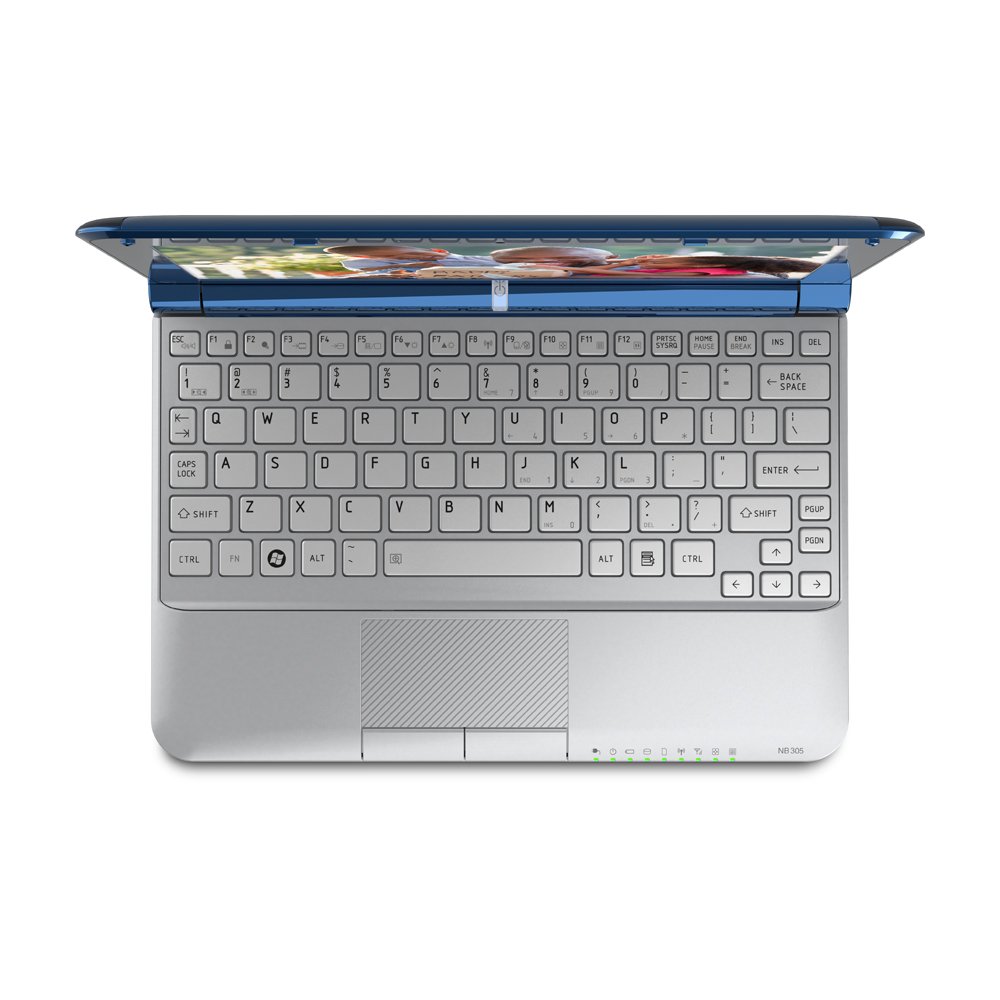
Yes, 2GB DDR3 memory is the plan and a Toshiba like this one is the NetBook brand. The `why' is their DDR3 =memory, SD card slot (a ReadyBoost candidate), 8+ hr battery life and the nice keyboard layout with a light colored all metal keyboard like THIS.
The default 250GB HDD will be transferred to a 2.5" external drive housing I have while a 64GB SSD takes it's place. I do not need more space than that!!! This desktop PC I'm using has a 250GB HDD, with practically everything I own (+all archives and backups) on it yet it still has 160.1GB of free space. The NetBook will have a fraction of that because it's grab-n-go, check the mail, check a post, check a website mission is very different.
Getting back to the original topic covered by this thread, Kubuntu will likely be the OS that runs it.
The default 250GB HDD will be transferred to a 2.5" external drive housing I have while a 64GB SSD takes it's place. I do not need more space than that!!! This desktop PC I'm using has a 250GB HDD, with practically everything I own (+all archives and backups) on it yet it still has 160.1GB of free space. The NetBook will have a fraction of that because it's grab-n-go, check the mail, check a post, check a website mission is very different.
Getting back to the original topic covered by this thread, Kubuntu will likely be the OS that runs it.
`09 F800ST
Member since Sept 10, 2001
"Talent, On Loan, From God" --Rush Limbaugh--
Member since Sept 10, 2001
"Talent, On Loan, From God" --Rush Limbaugh--
Re: What about Linux?
For the task/job you describe, Kubuntu sounds like it will fit the bill. One more thing, you might need a pair of strong glasses to see/read the small fonts on these things (a student was using the exact model described last night in class, and I could barely see/read the text on the screen). Best wishes and let us know how it all turns out.CycleRob wrote:Yes, 2GB DDR3 memory is the plan and a Toshiba like this one is the NetBook brand. The `why' is their DDR3 =memory, SD card slot (a ReadyBoost candidate), 8+ hr battery life and the nice keyboard layout with a light colored all metal keyboard like THIS.
The default 250GB HDD will be transferred to a 2.5" external drive housing I have while a 64GB SSD takes it's place. I do not need more space than that!!! This desktop PC I'm using has a 250GB HDD, with practically everything I own (+all archives and backups) on it yet it still has 160.1GB of free space. The NetBook will have a fraction of that because it's grab-n-go, check the mail, check a post, check a website mission is very different.
Getting back to the original topic covered by this thread, Kubuntu will likely be the OS that runs it.
-Bob-
2014 R1200R - Dark White
2007 R1200R - SOLD
2014 R1200R - Dark White
2007 R1200R - SOLD

Re: What about Linux?
Late to the party here, but this is topic of interest.
Recently tried Ubuntu NetBook, curious about the Linux thing that has been brewing for so many years. For general purpose netbook functions, the software package worked well, with Linux version of Firefox providing a familiar interface (it's what I'm using this moment on XP laptop), and the "skinny" Ubuntu NB system (apps + utilities) appealed to me in a Less is More fashion. System loaded fast - well, anything's fast compared with Windows - and crashed only a few times.
I read an article this morning that's somewhat relevant to Linux questions:
http://news.yahoo.com/s/digitaltrends/2 ... sdominance
During a recent business flight, I had a chance to chat with a techie headed down to Silicon Valley who -as self-proclaimed Early Adopter- was gushing about his iPad's performance. The iPad concept appealed to me as I envisioned a reliable moto-journey computing companion, or considered how my wife and kid spend their evening hours viewing and scrolling and messaging on Facebook, using laptops with never-used CD-rom drives and ports for peripherals.
By all appearances, the tablet computer appliance has really gained traction over the past year, and as mfrs. move to market with in-house operating systems developments for pads and smart phones, the issue of OS selection seems to be fading away into distant DOS history.
Recently tried Ubuntu NetBook, curious about the Linux thing that has been brewing for so many years. For general purpose netbook functions, the software package worked well, with Linux version of Firefox providing a familiar interface (it's what I'm using this moment on XP laptop), and the "skinny" Ubuntu NB system (apps + utilities) appealed to me in a Less is More fashion. System loaded fast - well, anything's fast compared with Windows - and crashed only a few times.
I read an article this morning that's somewhat relevant to Linux questions:
http://news.yahoo.com/s/digitaltrends/2 ... sdominance
During a recent business flight, I had a chance to chat with a techie headed down to Silicon Valley who -as self-proclaimed Early Adopter- was gushing about his iPad's performance. The iPad concept appealed to me as I envisioned a reliable moto-journey computing companion, or considered how my wife and kid spend their evening hours viewing and scrolling and messaging on Facebook, using laptops with never-used CD-rom drives and ports for peripherals.
By all appearances, the tablet computer appliance has really gained traction over the past year, and as mfrs. move to market with in-house operating systems developments for pads and smart phones, the issue of OS selection seems to be fading away into distant DOS history.
Rockster#2, K1300S, S1000R (for sale)
Re: What about Linux?
One of the reasons that I would look at an MacBook Air. The tablet OS is limited in what it can do; form factor on Air is 11"/full fledged computer. Netbooks for what was described above sounds like it will meet the needs. I have other Apple hw/sw, therefore, syncing my stuff up is actually pretty easy with an added Air. Also, the nextgen iPad is coming out soon. Best of all worlds would be to have MacOS X on the iPad. That would be an instant winner.sweatmark wrote:Late to the party here, but this is topic of interest.
Recently tried Ubuntu NetBook, curious about the Linux thing that has been brewing for so many years. For general purpose netbook functions, the software package worked well, with Linux version of Firefox providing a familiar interface (it's what I'm using this moment on XP laptop), and the "skinny" Ubuntu NB system (apps + utilities) appealed to me in a Less is More fashion. System loaded fast - well, anything's fast compared with Windows - and crashed only a few times.
I read an article this morning that's somewhat relevant to Linux questions:
http://news.yahoo.com/s/digitaltrends/2 ... sdominance
During a recent business flight, I had a chance to chat with a techie headed down to Silicon Valley who -as self-proclaimed Early Adopter- was gushing about his iPad's performance. The iPad concept appealed to me as I envisioned a reliable moto-journey computing companion, or considered how my wife and kid spend their evening hours viewing and scrolling and messaging on Facebook, using laptops with never-used CD-rom drives and ports for peripherals.
By all appearances, the tablet computer appliance has really gained traction over the past year, and as mfrs. move to market with in-house operating systems developments for pads and smart phones, the issue of OS selection seems to be fading away into distant DOS history.
[I feel better now.
 ]
]-Bob-
2014 R1200R - Dark White
2007 R1200R - SOLD
2014 R1200R - Dark White
2007 R1200R - SOLD
Re: What about Linux?
At $1000. for the least expensive MacBook Air, looking at it is all that some of us could do.angellr wrote:...One of the reasons that I would look at an MacBook Air...

jb
Re: What about Linux?
I dont disagree - price is definitely an issue. However, when you compare a "high-end" iPad vs. Air, there are only a few Benjamins separating the two.jb44 wrote:At $1000. for the least expensive MacBook Air, looking at it is all that some of us could do.angellr wrote:...One of the reasons that I would look at an MacBook Air...
jb
-Bob-
2014 R1200R - Dark White
2007 R1200R - SOLD
2014 R1200R - Dark White
2007 R1200R - SOLD
Re: What about Linux?
I agree, too.angellr wrote:...I dont disagree - price is definitely an issue. However, when you compare a "high-end" iPad vs. Air, there are only a few Benjamins separating the two.
 I'd love to have one of the new Airbooks.
But for carrying on the motorcycle, where there is a chance of it being stolen or broken, I'll stick with my under $300. netbook.
BTW, thanks for the update on Linux. I experimented with Ubuntu a few years ago (my first netbook came with it installed.) Think I'll give Kubuntu a try.
jb
-
iowabeakster
- Quadruple Lifer
- Posts: 1962
- Joined: Mon Mar 21, 2005 5:43 am
- Location: iowa city, ia
Re: What about Linux?
Rob,
How's your Linux experiment going?
How's your Linux experiment going?
I was dreaming when I wrote this, forgive me if it goes astray...
Re: What about Linux?
Yes, how is the experiment going? Enquiring minds would like to know ...iowabeakster wrote:Rob,
How's your Linux experiment going?
-Bob-
2014 R1200R - Dark White
2007 R1200R - SOLD
2014 R1200R - Dark White
2007 R1200R - SOLD
-
CycleRob
- Honorary Lifer
- Posts: 2857
- Joined: Mon Mar 21, 2005 12:29 am
- Location: Enjoying retirement in Gainesville GA. USA
- Contact:
Re: What about Linux?
Kubuntu 10.10 for Netbooks is waiting to be installed on the Toshiba NetBook (dual boot) to be purchased in a few days.
Crucial 2GB DDR3 memory is on the order list, with an Intel MLC 80GB SSD to be added by Winter. The NetBook's 250GB internal HD will be repurposed inside a desktop portable enclosure for backups. Already have an external DVD-RW USB drive with lightscribe for the NetBook.
My Desktop PC has XP Home on it and it is working well. Putting Linux on it may not be able to replace the things I do with my favorite programs like irfanview, TurboNavigator, Stamp3, Convert, AlZip and Nero Player that mostly do not have Linux versions. The inflexible, uncooperative, sluggish Vista Home Premium on the HP 17" Laptop drives me crazy. It may also get the dual boot configuration with Kubuntu desktop. The limited hardware/resources of NetBooks -and- the functionally lightweight Win 7 "starter" OS make them prime candidates for the fast/functional Linux distros.
Normally I would not splurge so wrecklessly on another computer, but the certain, eminent collapse of our USD makes it a smart move.
Crucial 2GB DDR3 memory is on the order list, with an Intel MLC 80GB SSD to be added by Winter. The NetBook's 250GB internal HD will be repurposed inside a desktop portable enclosure for backups. Already have an external DVD-RW USB drive with lightscribe for the NetBook.
My Desktop PC has XP Home on it and it is working well. Putting Linux on it may not be able to replace the things I do with my favorite programs like irfanview, TurboNavigator, Stamp3, Convert, AlZip and Nero Player that mostly do not have Linux versions. The inflexible, uncooperative, sluggish Vista Home Premium on the HP 17" Laptop drives me crazy. It may also get the dual boot configuration with Kubuntu desktop. The limited hardware/resources of NetBooks -and- the functionally lightweight Win 7 "starter" OS make them prime candidates for the fast/functional Linux distros.
Normally I would not splurge so wrecklessly on another computer, but the certain, eminent collapse of our USD makes it a smart move.
`09 F800ST
Member since Sept 10, 2001
"Talent, On Loan, From God" --Rush Limbaugh--
Member since Sept 10, 2001
"Talent, On Loan, From God" --Rush Limbaugh--
Re: What about Linux?
I have been experimenting with Linux over several years on my HTPC but it has been a constant source of anger. I spent endless nights trying to find the right configuration until it ran more or less stable. When I recently changed to HDTV and new HTPC (notebook technology - ASRock Vision 3D) the whole story started again until I finally decided to give the big fat american giant a chance. Installed Win7 Ultimate in about half an hour. Drivers from ASRock. Started Media Center and learned the TV channels. And in a matter of 1 hr the whole thing ran flawlessly.
No more messing around and got a system with a high WAF.
Hence I turned away from Linux. But for a different use it may still be a great solution. I have no shares (unfortunately) or whatsoever interest in this well known american company.
Brgds
Oliver
No more messing around and got a system with a high WAF.
Hence I turned away from Linux. But for a different use it may still be a great solution. I have no shares (unfortunately) or whatsoever interest in this well known american company.
Brgds
Oliver